
Create a Use Case for your campaign
To complete this guide you first must have completed this guide to submit your business information for verification
To create a use case for your campaigns you need to go to your account's Phone Provider Settings. Here, select the Perfectomy Phone Provider. After, click the tab that says Brand Settings. The window should look like this:
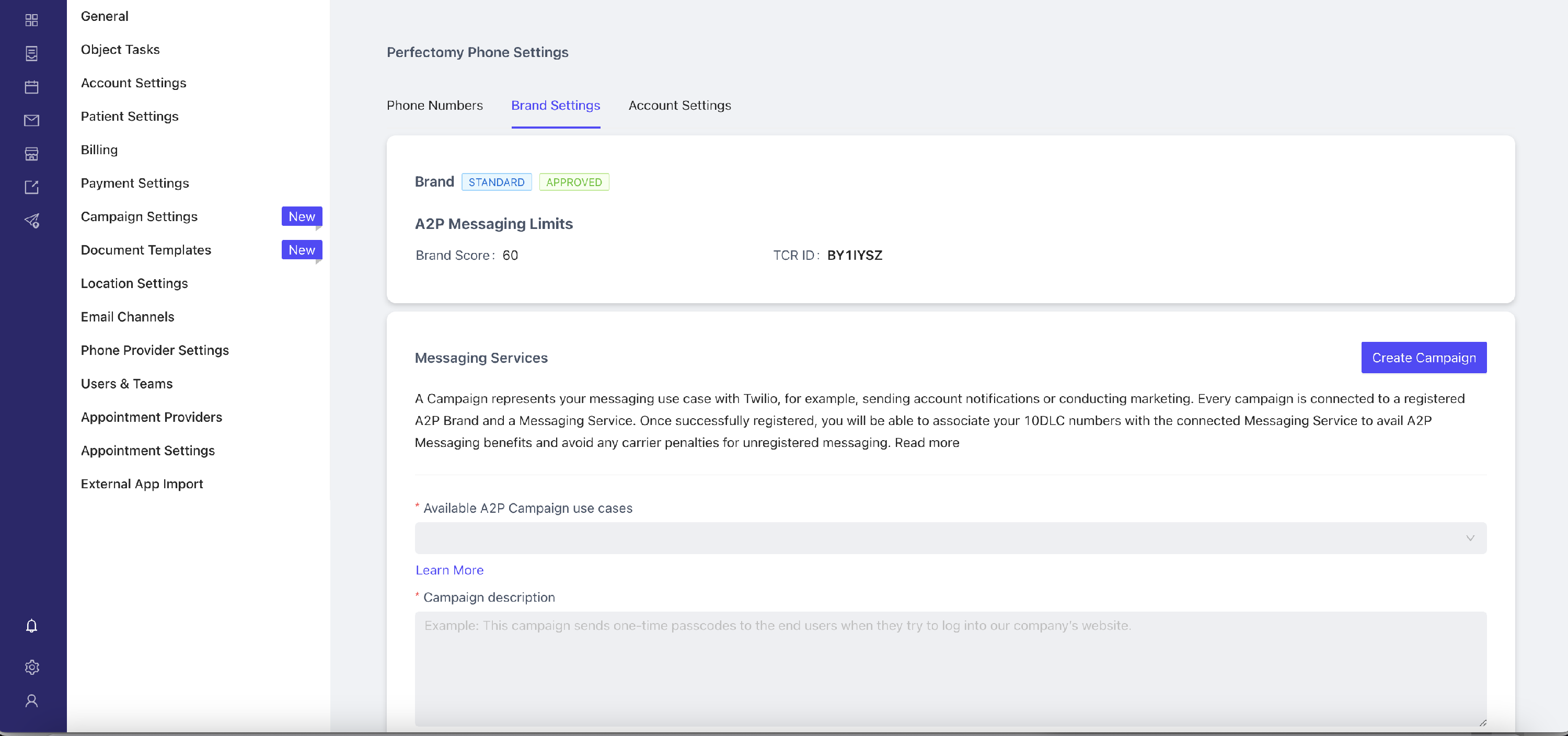
Here you can see your brand score, this will influence the rate at which you can send segments per second.
Below you can see the form to create the first Messaging Service for which you have to create a Campaign Use Case. This is a critical step of the application. You can click Learn More under each field for more information on how to fill it out.
It is very important to note the following:
- Remember to check the checkboxes for "Has embedded links" and "Has Embedded Phone" if your text messages will include either phone numbers or links.
- In the message samples add examples of phone numbers you will use in the text messages if you checked "Has Embedded Phone" and real links if you checked "Has Embedded links".
- In the field How do end-users consent to receive messages? be sure to add a link to the page where users sign up to receive text messages and make sure you have checkbox or a label where users agree to receive text messages from your company
After you complete all the fields click the "Create Campaign" button. After the campaign is approved a total of $10/month will be added your account subscription.
The campaign may take 5-7 days to be verified if it takes longer than that you are welcome to reach the support team to help you out.